
Run the benchmark.
Trust the score.
Berkway runs the benchmarks frontier labs report on any model, at any OpenAI-compatible endpoint. Every trial gets its own sandbox, every call is recorded, and the score comes with how far to trust it.
- GPT-6.2 Astra
- Run: Terminal-Bench 4.1, a demonstration
- 330/330
- Trials finished
- 52%
- Score, 42% to 62%
- $1,916
- Spent of $2,500
- 7h 17m
- Running time
Run what the labs report
Every frontier release comes with a table of these, and almost every figure in it was produced by the lab that made the model. Berkway runs the same benchmarks on any model and hands back a record anyone can check.
26benchmarks, and your own tasks beside them
- In the release notes of Claude Fable 5.2
- Claude Fable 5.2Release notes, November 9, 2026
- In the release notes of GPT-6.2 Astra
- GPT-6.2 AstraRelease notes, November 17, 2026
Terminals and computers3
Terminal-Bench4.1
In the release notes of Claude Fable 5.2 and GPT-6.2 AstraLong, hard tasks in a real terminal, each checked by its author’s verifier. A task may ask for 16 CPUs and eight hours.
The release notes report 4.0: the same 66 tasks, before the verifiers were hardened.
66 tasks
Terminal-Bench-Science0.1
In the release notes of Claude Fable 5.2 and GPT-6.2 AstraResearch computing from the sciences, done in a terminal and checked at the end.
70 tasks
OSWorld2.1
In the release notes of Claude Fable 5.2Real desktop applications, driven through the screen, the mouse and the keyboard.
Size not stated
Software engineering9
FrontierCode2.0
In the release notes of Claude Fable 5.2 and GPT-6.2 AstraCode changes judged by whether a project’s maintainers would merge them.
Size not stated
SWE-bench Pro
In the release notes of Claude Fable 5.2Long, professional changes to real repositories, judged by tests the agent never sees.
731 tasks
SWE-bench Multilingual
In the release notes of Claude Fable 5.2Real issues from open-source projects in nine programming languages.
300 tasks
SWE-bench Multimodal
In the release notes of Claude Fable 5.2Issues that come with a picture: visual bugs in front-end code.
Size not stated
FrontierSWE2
In the release notes of Claude Fable 5.2Software engineering tasks that run for many hours.
Size not stated
ProgramBench
In the release notes of Claude Fable 5.2Whole programs written to a specification and checked by tests.
200 tasks
DeepSWE1.1
In the release notes of GPT-6.2 AstraOriginal engineering tasks, written for the benchmark, that take a long time to finish.
113 tasks
SWE-Lancer Diamond
In neither release notePaid freelance software jobs, graded by tests that engineers wrote.
463 tasks
SWE-rebench
In neither release noteFresh issues gathered from open-source projects as they are filed, so no model was trained on them.
860 tasks
Professional work7
BenchCAD2.1
In the release notes of Claude Fable 5.2 and GPT-6.2 AstraParts modelled in CAD from a description.
Size not stated
GDPval
In the release notes of GPT-6.2 AstraReal work products from 44 occupations, graded against each task’s rubric by a judge model.
The public tasks, scored by rubric. The release notes report a win rate judged by experts, which this does not reproduce.
220 tasks
Harvey LAB
In the release notes of GPT-6.2 AstraLegal work, graded against criteria written by lawyers.
1,251 tasks
Remote Labor Index
In the release notes of Claude Fable 5.2Real freelance projects, judged against the work of the professionals who did them.
Size not stated
OfficeQA Pro
In the release notes of Claude Fable 5.2Questions answered from large collections of office documents.
Size not stated
APEX-Agents1.1
In neither release noteLong tasks from banking, consulting and law, done in the applications professionals use.
240 tasks
TheAgentCompany
In neither release noteA simulated software company: the agent works with its tools, its files and its colleagues.
174 tasks
Agents and tools3
AutomationBench
In the release notes of Claude Fable 5.2 and GPT-6.2 AstraBusiness workflows carried out across many applications.
Size not stated
τ³-bench
In neither release noteAn agent serving a simulated customer under a company’s policy, with the company’s tools.
375 tasks
GAIA
In neither release noteQuestions for a general assistant that need browsing, files and tools.
165 questions
Knowledge and reasoning4
Agents’ Last Exam1.1
In the release notes of GPT-6.2 AstraLong professional workflows, carried out by an agent from start to finish.
Size not stated
Humanity’s Last Exam
In the release notes of Claude Fable 5.2Questions written by experts at the edge of what is known in their fields.
Size not stated
ARC-AGI-3
In the release notes of Claude Fable 5.2Games never seen before, learned only by playing them.
Size not stated
GPQA Diamond
In the release notes of GPT-6.2 AstraGraduate-level science questions written by experts to resist a search.
198 questions
Berkway Smoke3 tasks
Create a file, fix a one-line bug, count lines in logs. Run it first: it proves your endpoint, the sandboxes and the grading in a few minutes, and it is free.
Your own tasksAny number
Private to your workspace and invisible to every other. They get the same sandboxes, traces, budgets, records and error accounting as the public ones.
A square marks a benchmark that the release notes of Claude Fable 5.2 or GPT-6.2 Astra report, read from the tables published with them. It says nothing of how any model scored, and Berkway prints no model’s result. A run starts from its benchmark’s official settings where its authors publish them, and its record lists any setting that departs from them. Where they publish none, the record says the settings are Berkway’s defaults. The benchmarks’ names belong to their authors.
On any model, from anyone
Any provider, any router, any server of your own: if it answers at an OpenAI-compatible base URL, Berkway can benchmark it, on your own key.
- OpenAI
- Anthropic
- Meta
- xAI
- Mistral AI
- DeepSeek
- Qwen
- Microsoft
- NVIDIA
- Amazon
- Cohere
- Moonshot AI
- Z.ai
- MiniMax
- Perplexity
- Tencent
- Baidu
- ByteDance
- IBM
- Xiaomi
- Liquid AI
- StepFun
- Upstage
- Reka
- Sakana AI
- Reflection AI
- Thinking Machines
- openai/gpt-6.2-astra
- anthropic/claude-fable-5.2
- google/gemini-4-neon
- meta/muse-ember
- x-ai/grok-4.7
- mistralai/mistral-large-4-0
- deepseek/deepseek-v4-pro-0813
- qwen/qwen4-max
- moonshotai/kimi-k3.1-pro
- z-ai/glm-5.3-prime
- thinkingmachines/inkling-2-small
- nvidia/nemotron-3.5-super-vl
These companies make models Berkway can call, on your key, and the line above names the newest of each on November 21, 2026, when a public catalogue listed 476 models. Their names and marks belong to them and are shown to say what Berkway works with. None of them endorses Berkway or is affiliated with it.
How a run goes
From a model’s name to a score you can defend, in four moments. The drawings are of the product.
Pick a model and a benchmark
Connect an endpoint once: any OpenAI-compatible base URL, with your own key. Then choose the model and the benchmark. A run starts from the benchmark’s official settings, and the form shows what it will draw from your credits before you launch.
New runDemonstration - Model
- GPT-6.2 Astra
openai/gpt-6.2-astra - Host
openaiHeld to it. No fallback- Benchmark
- Terminal-Bench 4.166 tasks, 5 trials each
- Agent
- The leaderboard’s own
- Sandbox
- 2.2 standard$0.04 a minute, from your credits
- Budget
- $2,500.00The run halts at the call that reaches it
- At a time
- 32 trials
Launch 330 trialsEvery trial runs in its own sandbox
Each trial gets a fresh sandbox, as large as its task asks for, and they run as many at a time as you set. A provider or a sandbox that fails is tried again, then reported as an error. It is never scored as the model’s failure.
GPT-6.2 Astra on Terminal-Bench 4.1Demonstration - 166
- Passed
- 154
- Failed
- 10
- Errored
- 0
- Running
- 0
- Queued
Passes and failures are scored. An error is the infrastructure’s, and is left out.
Every call is recorded as it happens
A trial’s trace is a terminal session: what the agent said, what it typed, what came back and what each call cost. Open a trial while it runs and the window follows it.
Berkway Smoke / count-errors, attempt 1Recorded November 20, 2026 I'm at the root prompt in the /app directory. I need to examine the logs directory to count ERROR level entries across all .log files. First, I should check what files exist in the logs directory.
root@ec2db317384b:/app# ls -la /app/logs
total 28
drwxr-xr-x 2 root root 4096 Nov 20 15:22 .
drwxr-xr-x 1 root root 4096 Nov 20 16:10 ..
-rw-r--r-- 1 root root 6977 Nov 20 15:22 api.log
-rw-r--r-- 1 root root 3360 Nov 20 15:22 scheduler.log
-rw-r--r-- 1 root root 5010 Nov 20 15:22 worker.log
root@ec2db317384b:/app#
Call 1, 898 tokens, $0.0002, 3.0s
I can see there are three log files in the /app/logs directory: api.log, scheduler.log, and worker.log. Now I need to examine the format of these files to understand how to extract lines with ERROR level.
root@ec2db317384b:/app# head -n 5 /app/logs/api.log
2026-11-01T12:00:00Z INFO api request 0 handled
2026-11-02T12:01:00Z INFO api request 1 handled
2026-11-03T12:02:00Z WARN api request 2 handled
2026-11-04T12:03:00Z INFO api request 3 handled
2026-11-05T12:04:00Z INFO api request 4 handled
root@ec2db317384b:/app#
Call 2, 1,242 tokens, $0.0003, 3.1s
The format matches what was described. Each line has a timestamp, level, service, and message. I can see levels like INFO, WARN. Now I need to check if there are any ERROR level entries and how to properly count them across all files.
root@ec2db317384b:/app# grep -E '^[^ ]+ ERROR ' /app/logs/*.log
/app/logs/api.log:2026-11-06T12:05:00Z ERROR api request 5 handled
/app/logs/api.log:2026-11-09T12:08:00Z ERROR api request 8 handled
/app/logs/api.log:2026-11-02T12:10:00Z ERROR api request 10 handled
/app/logs/api.log:2026-11-02T12:19:00Z ERROR api request 19 handled
/app/logs/api.log:2026-11-05T12:22:00Z ERROR api request 22 handled
/app/logs/api.log:2026-11-08T12:25:00Z ERROR api request 25 handled
… 55 more lines
Call 3, 1,601 tokens, $0.0004, 2.7s
I can see multiple ERROR level entries across all three log files. The grep command successfully identified lines where the second field is exactly 'ERROR'. Now I need to count these lines and write the count to /app/answer.txt.
root@ec2db317384b:/app# grep -E '^[^ ]+ ERROR ' /app/logs/*.log | wc -l
60
root@ec2db317384b:/app#
Call 4, 3,807 tokens, $0.0009, 2.7s
I've counted 60 ERROR level entries across all log files. Now I need to write this count to /app/answer.txt as requested.
Current terminal state:
New Terminal Output:

root@ec2db317384b:/app# echo 60 > /app/answer.txt
root@ec2db317384b:/app#

Are you sure you want to mark the task as complete? This will trigger your solution to be g…
Call 5, 3,980 tokens, $0.0005, 1.4s
I have successfully completed the task. I counted the ERROR level entries across all log files in /app/logs and found there were 60 such entries. I've written this count to /app/answer.txt as requested.
Call 6, 4,197 tokens, $0.0005, 1.6s
- 6
- Calls
- 15.7k
- Tokens
- $0.0029
- Spent
- 51s
- Passed
A score, and how far to trust it
The result is the mean over tasks with its 95% interval, a count of what errored and was left out, and a note for every setting that departs from the official ones.
GPT-6.2 Astra on Terminal-Bench 4.1Demonstration 52%
The mean over 66 tasks. Its 95% interval runs from 42% to 62%.
- Scored
- 166 passed, 154 failed
- Left out
- 10 erroredInfrastructure, not the model
- Solved
- 49 of 66 tasks at least once
- Settings
- OfficialA changed setting would be named here
- Spent
- $1,916.35 of $2,500.00in 7h 17m
- Model
- GPT-6.2 Astra
openai/gpt-6.2-astra - Host
openaiHeld to it. No fallback- Benchmark
- Terminal-Bench 4.166 tasks, 5 trials each
- Agent
- The leaderboard’s own
- Sandbox
- 2.2 standard$0.04 a minute, from your credits
- Budget
- $2,500.00The run halts at the call that reaches it
- At a time
- 32 trials
- 166
- Passed
- 154
- Failed
- 10
- Errored
- 0
- Running
- 0
- Queued
Passes and failures are scored. An error is the infrastructure’s, and is left out.
I'm at the root prompt in the /app directory. I need to examine the logs directory to count ERROR level entries across all .log files. First, I should check what files exist in the logs directory.
root@ec2db317384b:/app# ls -la /app/logs
total 28
drwxr-xr-x 2 root root 4096 Nov 20 15:22 .
drwxr-xr-x 1 root root 4096 Nov 20 16:10 ..
-rw-r--r-- 1 root root 6977 Nov 20 15:22 api.log
-rw-r--r-- 1 root root 3360 Nov 20 15:22 scheduler.log
-rw-r--r-- 1 root root 5010 Nov 20 15:22 worker.log
root@ec2db317384b:/app#
Call 1, 898 tokens, $0.0002, 3.0s
I can see there are three log files in the /app/logs directory: api.log, scheduler.log, and worker.log. Now I need to examine the format of these files to understand how to extract lines with ERROR level.
root@ec2db317384b:/app# head -n 5 /app/logs/api.log
2026-11-01T12:00:00Z INFO api request 0 handled
2026-11-02T12:01:00Z INFO api request 1 handled
2026-11-03T12:02:00Z WARN api request 2 handled
2026-11-04T12:03:00Z INFO api request 3 handled
2026-11-05T12:04:00Z INFO api request 4 handled
root@ec2db317384b:/app#
Call 2, 1,242 tokens, $0.0003, 3.1s
The format matches what was described. Each line has a timestamp, level, service, and message. I can see levels like INFO, WARN. Now I need to check if there are any ERROR level entries and how to properly count them across all files.
root@ec2db317384b:/app# grep -E '^[^ ]+ ERROR ' /app/logs/*.log
/app/logs/api.log:2026-11-06T12:05:00Z ERROR api request 5 handled
/app/logs/api.log:2026-11-09T12:08:00Z ERROR api request 8 handled
/app/logs/api.log:2026-11-02T12:10:00Z ERROR api request 10 handled
/app/logs/api.log:2026-11-02T12:19:00Z ERROR api request 19 handled
/app/logs/api.log:2026-11-05T12:22:00Z ERROR api request 22 handled
/app/logs/api.log:2026-11-08T12:25:00Z ERROR api request 25 handled
… 55 more lines
Call 3, 1,601 tokens, $0.0004, 2.7s
I can see multiple ERROR level entries across all three log files. The grep command successfully identified lines where the second field is exactly 'ERROR'. Now I need to count these lines and write the count to /app/answer.txt.
root@ec2db317384b:/app# grep -E '^[^ ]+ ERROR ' /app/logs/*.log | wc -l
60
root@ec2db317384b:/app#
Call 4, 3,807 tokens, $0.0009, 2.7s
I've counted 60 ERROR level entries across all log files. Now I need to write this count to /app/answer.txt as requested.
Current terminal state:
New Terminal Output:

root@ec2db317384b:/app# echo 60 > /app/answer.txt
root@ec2db317384b:/app#

Are you sure you want to mark the task as complete? This will trigger your solution to be g…
Call 5, 3,980 tokens, $0.0005, 1.4s
I have successfully completed the task. I counted the ERROR level entries across all log files in /app/logs and found there were 60 such entries. I've written this count to /app/answer.txt as requested.
Call 6, 4,197 tokens, $0.0005, 1.6s
- 6
- Calls
- 15.7k
- Tokens
- $0.0029
- Spent
- 51s
- Passed
52%
The mean over 66 tasks. Its 95% interval runs from 42% to 62%.
- Scored
- 166 passed, 154 failed
- Left out
- 10 erroredInfrastructure, not the model
- Solved
- 49 of 66 tasks at least once
- Settings
- OfficialA changed setting would be named here
- Spent
- $1,916.35 of $2,500.00in 7h 17m
A score you can check
A number is worth what the run behind it is worth. These are the rules every run keeps.

A budget is a limit
Set it in dollars and the run halts at the call that reaches it. Trials still working go back to the queue unscored, and raising the budget resumes them.
One host, named
When your endpoint is a router, the run is held to one host, down to its quantisation, with no fallback to another, and the record names it. Two runs of one model are two runs of the same weights.
A clock that counts work
Time stands still while a run is paused or halted, and a trial waiting in the queue has no clock at all.
Your key never enters a sandbox
It is encrypted where it is stored and sent only to the address it was saved for. An agent reaches the model through Berkway, with a token that works for one trial.
Tasks are the unit, not attempts
Five attempts at one task are not five pieces of evidence. They are averaged first, and the interval is taken over tasks.
Every run ends in a record
The score is one line of it. The rest is what lets someone else believe the score.
It states its departures
Official settings are said in two words. Anything else is listed, a line each, where nobody can miss it.
It counts what it left out
Trials that broke are counted by kind beside the trials that were scored, so a reader sees that none of them was held against the model.
It says how many tries there were
Run a benchmark five times and the record of each run says so. A reader knows whether they are looking at the only run or the best of several.
It has an address
Publish it and anyone can read it, with no account. The page checks the record’s digest in the reader’s browser, and one line of shell checks it again.
GPT-6.2 Astra on Terminal-Bench 4.1
openai/gpt-6.2-astra
52%
42% to 62%
95% interval over 66 tasks
Official settings
- Benchmark
- Terminal-Bench 4.1, 66 tasks, 5 trials each
- Served by
- A router that can pin each call to one host
- Host
- openai, pinned
- Agent
- The leaderboard’s own
- Sandbox
- Every trial ran in its own sandbox, made for it and removed after it.
- Departures
- None
- Tries
- The only run of this benchmark on this model and host
- Trials
- 330 planned, 320 scored
- Scored
- 166 passed154 failed
- Left out
- 10 errored, not the model’s
- Sandbox time
- 208h 12m, scored trials only
- Model spend
- $1,916.35
- Digest
- sha256:d0f2c797c1…9fe58d
- Address
- app.berkway.com/r/d0f2c797c1a3
A demonstration, played from a seed. The model is real and the figures are not its results. A record holds no task, prompt or model output, so publishing one never leaks a benchmark.
Who it is for
Three kinds of team have to answer for a score. None of them should have to build this to do it.
A host serving an open model
A new model is out, and you serve it by Friday.
Run it through your own endpoint on the benchmarks its maker reported. When your score sits inside theirs, your serving is the real thing, and you have a record that says so.
- Model
- moonshotai/kimi-k3.1-pro
- Served by
- your endpoint
- Settings
- official
A lab shipping a model
Release day needs a number someone else produced.
Run the checkpoint on the benchmarks your release notes will list, by their rules, before you publish. The record states every setting and the interval, so the table in your notes survives being questioned.
- Benchmark
- Terminal-Bench 4.1
- Trials
- 330, 5 a task
- Settings
- official
A team building an agent
Your own tasks are your benchmark.
Bring a folder of them. Run it on each model and host you are choosing between, under one budget, and compare like with like. The tasks stay private to your workspace.
- Benchmark
- 40 tasks of your own
- Attempts
- 3 a task
- Budget
- a limit, in dollars

330 trials. How many at once?
13h 45mFor the whole benchmark
All of Terminal-Bench 4.1 by its leaderboard’s rules: 66 tasks, 5 trials each, 330 trials, one square apiece. The figure is arithmetic on our planning figure of 40 minutes a trial, which a full run of our own will replace. The plate plays it 6,000 times faster than life.
What a run costs
Two bills, and you can work out both before you launch. A budget you set in dollars stops the run at the call that reaches it.
- Your provider
- The model’s calls, on your own key. Runs on the current Terminal-Bench leaderboard have cost up to $16,500 in tokens, depending on the model.
- Berkway
- $0.02 for each minute a scored trial holds a standard sandbox. Terminal-Bench 4.1 asks for larger ones, and at our planning figure of 40 minutes a trial a full run comes to about $581. A trial that ended in an error is not charged.
$20,000
in credits for every new workspace, good for 90 days.
About 34 full Terminal-Bench 4.1 runs at our planning figure of 40 minutes a trial. Runs draw on them at the list price, and stop when they run out until more are added.
run_7k2m9xDemonstration
GPT-6.2 Astra on Terminal-Bench 4.1
openai/gpt-6.2-astra, held to openai
- Trials that passed166
- $965.42
- Trials that failed154
- $892.93
- Trials that errored10
- $58.00
- To the provider
- $1,916.35
- From your credits12,493 minutes of scored trials, at 2.2 standard sandboxes
- $549.69
$2,466
The whole run: 330 trials in 7h 17m, under a budget of $2,500.00 for the model’s calls.
A bench mark is a place
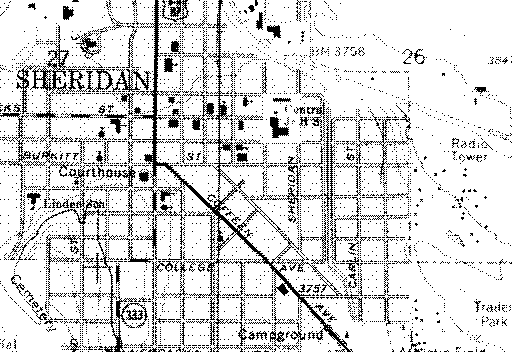
What the word means
A bench mark is a point a surveyor measured once and cut into stone, so that anyone could come back and measure from the same place. This 1968 sheet of Sheridan prints each one as BM, with its height in feet. A score should be that kind of thing: one host, the official settings, and a note when either changes.
Where we are
Berkway is a Wyoming company. Coffeen Avenue is the diagonal across this sheet, and our address is 1309 Coffeen Avenue, Sheridan, WY 82801.
Questions
Which models can I benchmark?
Any model, from any provider, behind any OpenAI-compatible base URL: a lab’s own API, a router, a server you run yourself. You bring the address and your own key. When the address is a router, the run is held to one host with no fallback, and the record names it.
Do you see my API key?
You type it once, when you connect an endpoint. It is checked, encrypted and stored, and it is only ever sent to the address it was saved for. It never enters a sandbox: an agent reaches the model through Berkway with a token that works for one trial. Remove the connection and no new run can use it.
Are the scores comparable with the leaderboards?
A run starts from the benchmark’s official settings. For Terminal-Bench 4.1 that is the leaderboard’s rules: 5 trials a task, timeouts and resources untouched. If you change a setting, the run’s record lists the change. Berkway does not submit results to a leaderboard for you.
Can I publish a result?
Yes. A finished run has a record, and you can publish it at a public address that anyone can read without an account. It states the benchmark and its version, every setting and every change from the official ones, the model and the host that served it, how each trial ended, and the score with its interval. It holds no task, prompt or model output. You can withdraw it whenever you like.
What happens when a provider or a sandbox fails?
The call or the trial is tried again. If it keeps failing, the trial ends as errored, with the kind of error, and is left out of the score. Nothing that was not the model’s doing is counted as a failure, and nothing that errored is charged.
Can a run spend more than I allow?
Set a budget in dollars and the run halts at the call that reaches it. Trials that were still working go back to the queue unscored, and you can raise the budget and resume. The spend is what your endpoint reports for each call, or your prices per million tokens where it reports none.
Can I run my own benchmark?
Yes. During the pilot we add your tasks to your workspace with you, and they get the same sandboxes, traces, budgets, records and error accounting as the public ones. No other workspace can see them.
What does Berkway cost?
$0.02 for each minute a scored trial holds a standard sandbox, charged by the second. Every new workspace starts with $20,000 in credits, good for 90 days. A full Terminal-Bench 4.1 run comes to about $581 at our planning figure. Errors are not charged, and the model’s calls are billed by your provider, on your own key.